¶ Switching from MegaRAC to OpenBMC
The version of wget in MegaRAC only supports http and ftp URLs - not https. So, we fetch the OpenBMC firmware via http:// along with the embedded_reflash tool which will rewrite the flash chip.
Then, make embedded_reflash executable, rename the .mtd file flash.img which is what embedded_reflashw expects and then run embedded_reflash.
You should see it erase the flash, program flash.img, verify it and then reset the system. Wait 2-3 minutes for the BMC to reboot, then you should be able to login to OpenBMC! Note that while MegaRAC uses a hard-coded IP address of 192.168.0.100, OpenBMC uses DHCP by default, so you may need to find which address it's been assigned from your DHCP server.
Note that until the PSU is powered off then on again (i.e. the entire board is power cycled), the host will fail to turn on and you'll see an error in the Event Log saying the power good signal failed to assert within 8000 ms.
ssh sysadmin@<BMC-IP>
cd /tmp
wget http://bsdio.com/bexcran-openbmc/obmc-comhpcalt-v1.2.1-20240425-32MB.mtd
wget http://bsdio.com/embedded_reflash
chmod +x embedded_reflash
mv -iv obmc-comhpcalt-v1.2.1-20240425-32MB.mtd flash.img
./embedded_reflashI've created a video showing the process at www.youtube.com/watch?v=Hx-R0alySbA
¶ Swapping EEPROMs
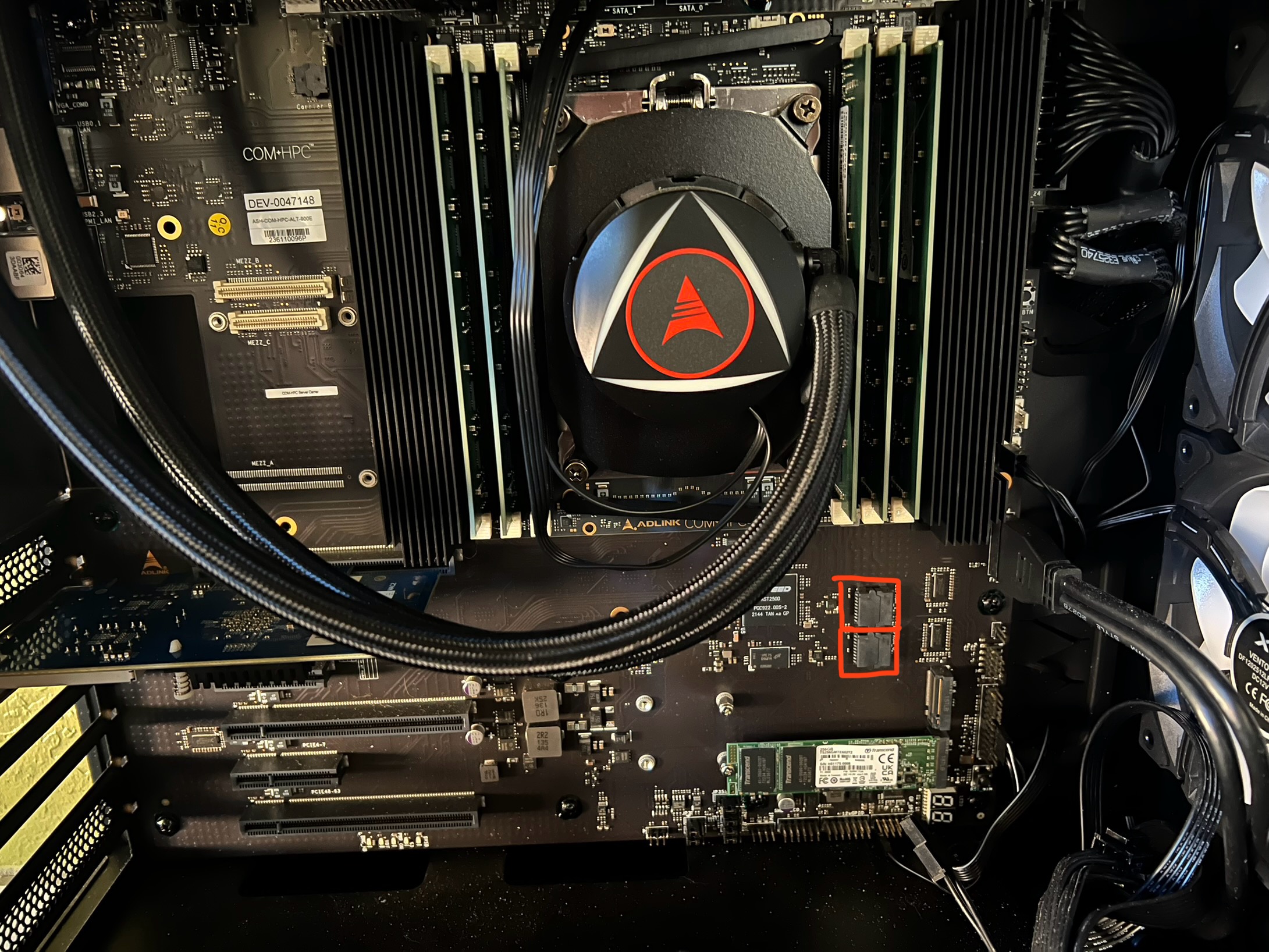
If you've received replacement SPI-NOR EEPROMs instead, you can simply open the two EEPROM sockets and swap out the old ones with the replacements.
In the photo below, the two EEPROM sockets are highlighted by red squares. The primary is at the bottom and the secondary/backup above it.
Video showing how to open the sockets: